Online Income Mastery: 7 Ways to Earn Online.

Start your journey to financial freedom with 'Online Income Mastery: 7 Ways to Earn Online'. This comprehensive guide reveals the secrets to unlocking a world of digital opportunities, providing a roadmap for individuals seeking diverse streams of online income.
Discover the art of freelancing, where your skills become your currency. Platforms like Upwork and Fiverr provide gateways to the global marketplace. Dive into the dynamic field of affiliate marketing, leveraging your influence to earn commissions by promoting products. E-commerce takes center stage, providing insight into setting up a thriving online store, whether it's through Shopify, WooCommerce, or Etsy.
Education meets innovation as the guide discusses creating and selling online courses. Platforms like Udemy and Teachable empower you to share your expertise with a global audience. Explore the lucrative market of digital products – from eBooks to templates – with strategies for creating and selling your creations.
Remote work is demystified, offering tips on how to secure a virtual position and thrive in a digital workplace. Dive into the exciting world of investing and trading, where financial skills can yield significant returns. The guide emphasizes starting small and gradually increasing your efforts.
Each path is packed with practical steps to empower you to navigate the ever-evolving landscape of online income. Success requires dedication, adaptability and a strategic approach. Whether you're a freelancer, entrepreneur, or investor, this guide equips you with the tools you need to master the art of online income generation. Join the digital revolution and transform your financial landscape with 'Online Income Mastery'.

Freelancing:
Freelancing involves offering your skills and services to clients on a project basis.
How to get started: Create a profile on a freelancing platform like Upwork or Fiverr. Highlight your skills, experience and portfolio. Bid on relevant projects and provide high quality work to build a positive reputation.
Affiliate marketing:
Affiliate marketing is the process of earning commission by promoting other people's (or company's) products.
How to get started: Join affiliate programs related to your niche. Create content (blog posts, videos, social media posts) where you promote products and include affiliate links. Earn commission for every sale made through your unique link.
E-Commerce:
E-commerce involves selling products or services online through your own store or established platform.
How to get started: Choose a niche or product to sell. Set up an online store using a platform like Shopify, WooCommerce, or Etsy. Market your products through social media, SEO and other online channels.
Online course:
Creating and selling online courses allows you to share your expertise and knowledge with a wide audience.
How to get started: Identify your area of expertise. Create well-structured course content. Use platforms like Udemy, Teachable or Skillshare to host and sell your courses.
Digital Products:
Selling digital products involves creating and selling items that can be downloaded, such as ebooks, templates, or stock photos.
How to get started: Create high quality digital products. Set up an online store using a platform like Gumroad or Selz. Market your products through your website, social media and email.
Remote Work Opportunities:
Remote work allows you to work for a company or as a freelancer from anywhere, eliminating the need for a physical office.
How to get started: Look for remote job opportunities on job boards like RemoteOK or FlexJobs. Network on LinkedIn and attend virtual job fairs. Prepare for remote interviews and showcase your skills.
Investment and Trading:
Investing and trading involves placing money in financial assets with the aim of obtaining returns.
How to get started: Learn about different investment options like stocks, bonds or cryptocurrencies. Open an online brokerage account. Start with small investment and gradually increase the investment as you gain experience.
Remember, success in online income generation often involves a combination of these strategies. Choose the path that best suits your skills, interests, and long-term goals. Constant learning and adapting to market trends is the key to mastering online income streams.
How to know who blocked you on WhatsApp

WhatsApp has slowly replaced your traditional text messages in a good way. The app not only offers you ways to share messages but also multimedia and documents like PDF, word files and more.
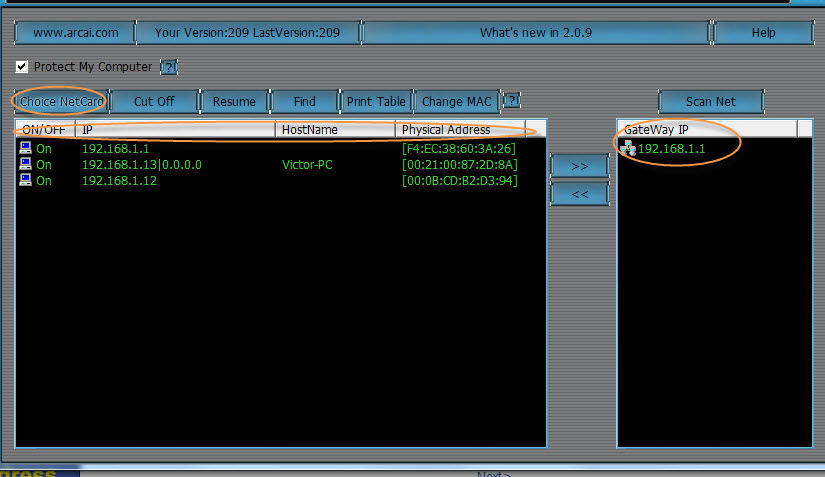
Get full bandwidth in Public WiFi or LAN in college or Schools Working Tested Trick
Repairing a corrupt flash drive Using Command Prompt Trick

Hi.. In This Tutorial i will Show you Steps for repairing your USB Pendrive..
How to Hack School Laptops?

1. First of all we have to find a way to get into "Startup Repair". All I done was started it and mid boot disconnected the battery, this probably isn't good for it, but it works.
2. Wait for the "Startup Repair" to complete, it will say that it found no errors and give you the option to send a report. Do not close this box!
3. Find where it says "View error information" or something similar to that, Click on it and it will open up a notepad.
4. Click File > Save, then navigate to C:/windows/system32/.
5. Locate rename "osk.exe" to anything, this is the On Screen Keyboard.
6. Locate and copy "cmd.exe" and paste it in system32 and rename the copy of "cmd.exe" to "osk.exe".
7. You are now finished with "Startup Repair", reboot your laptop but do not login!
8. Click the "Accessibility Wheel" and turn on "On Screen Keyboard".
9. This will open command prompt, type 'control userpasswords2' and set your account to administrator!
Congratulations you are now Administrator!
Now all you need to do is locate your proxy client that is installed on your laptop. You can find this in "Program Files".
Mine was "BlueCoat Proxy", I renamed the "ProxyClientConfig.xml" to something else and it disables it.'
You're all done, it's pretty simple.
Please Say thanks.....And do-do like my facebook page.

How To Bypass Adf.ly Links Aug 2013
HI guys !! We are always annoyed by the ruining 5 seconds wait before going to the page we want to go so these sites are always head in our way and say wait for 5 second . Isn't it annoying? Some ISP's have blocked these sites so we can never get to the other side of these links. But not TodaY!!! EGYHACKS have found a new way to buypass these sites which i will show you how to do in this post. Less See How-
|
Sony Experia Neo L JellyBean 4.1 Update Firmware

How to remove Windows 8.1 Watermark (Tested)


Step 2 – Intall_Take_Ownership.reg

Step 3 – Take Ownership
Windows\System32\en-US\shell32.dll.muiWindows\Branding\Basebrd\en-US\basebrd.dll.mui


Step 4 – Copy Edited Files

Step 5 – Open Command Prompt

Step 6 – Run mcbuilder
mcbuilder

Step 7 – Restart your computer
Step 7 – Remove Take Ownership

- Change the desktop wallpaper
- Replace the files in safe mode
Thanks For Viewing
Put Your valueable comments below-
☺☻--------What τhe H@ck---------☻☺


Turn Your Windows 8 Laptop into a Wireless Access Point


+Build+9385+X86+Torrent.png)

